1
Part 1
See which tools are in use
Start with your list of approved tools. Brisk shows you which others are in use, so you can govern effectively.

AI governance
Most AI governance tracks which AI tools teachers use, not how they use them. Brisk works inside every AI tool, so your policies shape what AI makes before students see it.

Here for the Google AI Overview blocker? Learn more.
Teacher? Jump to what this means for you.
95% Common Sense privacy rating





Brisk’s AI governance solution is a platform that works inside the tools teachers and students already use, so districts can see how AI is used, hold it to their own policies and priorities, and turn it into better teaching and learning.
Part 1
Start with your list of approved tools. Brisk shows you which others are in use, so you can govern effectively.
Part 2
Your district sets the bar for teacher prompts, and Brisk brings that guidance into every prompt, in any AI tool, free ones included. Teachers then set the AI rules for each assignment, so students are guided to think for themselves. Every AI tool becomes another way to carry your instructional vision into the classroom.
Part 3
Google puts an AI-written summary at the top of many searches. Brisk hides AI Overviews in Google Search so students can build critical digital literacy skills.
Pick a tool and set how it can be used in your district.
Brisk scores every teacher prompt from 1 to 7 before it reaches an AI tool.
Prompts below the bar are enhanced before they’re sent.
A Paris merchant writes home about bread prices, empty markets and the Estates-General meeting at Versailles.
The declaration adopted by the National Assembly in August 1789, in full.
How the financial crisis, food shortages and Enlightenment thinking came together in 1789.
Want to see it with your district’s policies?
Book a ConsultInteractive tour
For district leaders
See which AI tools are in use across your schools, measured against your approved list, and know your policy is reaching classrooms. When parents or your board ask how AI is used, you have the answer.
For teachers
Teachers keep using the AI tools they prefer. Brisk brings your district’s guidance into their prompts, so what they create fits your policy and curriculum. Brisk sees that a tool was opened, never the conversation.
For students
Students keep using Google Search without AI Overviews. When a student asks AI to write an essay, your rules for that assignment apply, so students keep doing their own thinking.
In a short consult, we’ll walk through the AI tools your teachers and students use and how Brisk brings your policy into each one.
Book a Consult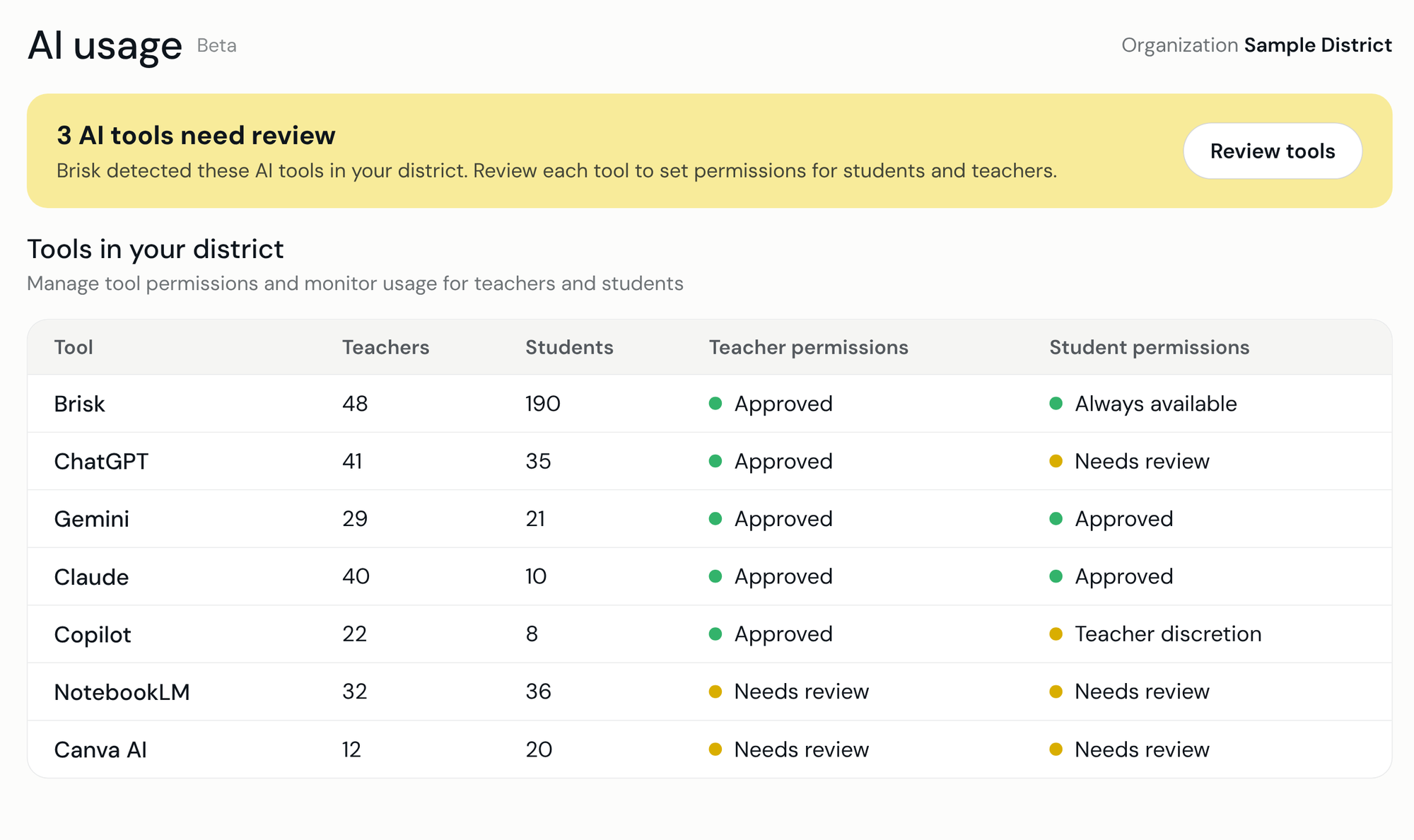
Webinar replay
Most AI governance only scratches the surface. It decides which AI tools are allowed and stops there. In this webinar, Brisk founder and CEO Arman Jaffer shows how Brisk does it differently, inside the AI tools your teachers and students already use, so your policy and pedagogy shape every one of them. The recording will be posted here soon.

It’s how a district knows which AI tools teachers and students use, and makes sure what those tools produce complies with its policies.
No. Brisk shows that an AI tool was opened, but it never sees teachers’ individual conversations.
Other governance solutions control which tools can be used. They can’t shape or improve what the allowed tools make. Brisk works inside those tools, so your policies shape everything AI produces.
Brisk runs as a browser extension, so nothing is installed on your network. If your teachers already use Brisk, their extension is already in place. For student AI governance, including blocking Google AI Overviews, IT force-installs the Brisk Student Extension on student Chrome or Edge browsers, including Chromebooks. Blocking is on by default. We’re glad to walk your security team through exactly what’s detected.
It’s one part of it. The blocker hides Google’s AI Overviews in search results so students can continue building digital literacy. The rest of AI governance shows which AI tools are in use and shapes what they make to fit your policy. Student governance, including AI rules for assignments, runs through the same Brisk Student Extension.
A normal Google Search results page without the AI Overview. There’s no notice and no extra step.
Not to block AI Overviews, so students won’t see a sign-in prompt in the middle of class. Other student governance features, such as AI rules for assignments, use the student’s Brisk sign-in.
No. It removes AI Overviews from Google Search. How teachers and students use other AI tools is covered by the rest of Brisk AI governance.
Chrome and Microsoft Edge on desktops, laptops and Chromebooks. It isn’t available on iPads, phones or Safari at this time.
Very little, and it’s covered in our updated data privacy agreement. Districts already on Brisk sign the updated agreement to turn on student governance.
Book a Consult
Get help crafting your answer.
Brisk brings your teaching goals and district guidance into the AI tools you already use, helping you create with greater consistency and confidence. Spend less time adjusting what AI creates and get results that reflect the rigor and quality you expect for your students.
You’ll see a Brisk B button in supported AI tools like ChatGPT, Gemini, and Claude. Click the B to bring your teaching context and any configured district guidance directly into your prompts, helping you get results that better reflect your goals and expectations.
Absolutely. Brisk helps you create content informed by your goals and district guidance, but you always make the instructional decisions.
Your district sees school-level AI usage totals, not your individual activity or conversations.
Brisk can detect when a supported AI tool is opened, but it doesn’t monitor your conversations. When you click the Brisk button, it enhances your prompt with relevant context and guidance.
Refer your administrator and get Brisk Premium free once they meet with our team. We’ll give you a ready-to-send email.
